When preparing a 3D model for manufacturing, the file format affects how accurately design intent transfers into physical parts. OBJ and STL files are often treated as interchangeable, but they serve different roles depending on the process. The way each format stores geometry and surface data influences how the model behaves during slicing, toolpath generation, and verification.
In CNC machining, STL files are mainly used for reference models, stock definition, or simulation, where only external geometry matters. OBJ files appear more often in design review, reverse engineering, or hybrid workflows that involve scanned data or surface visualization. In 3D printing, STL remains the standard for most slicing software, while OBJ is preferred when color, texture, or multi-material information must be preserved. Choosing the correct format early helps prevent data loss, translation errors, and unnecessary rework before production begins.
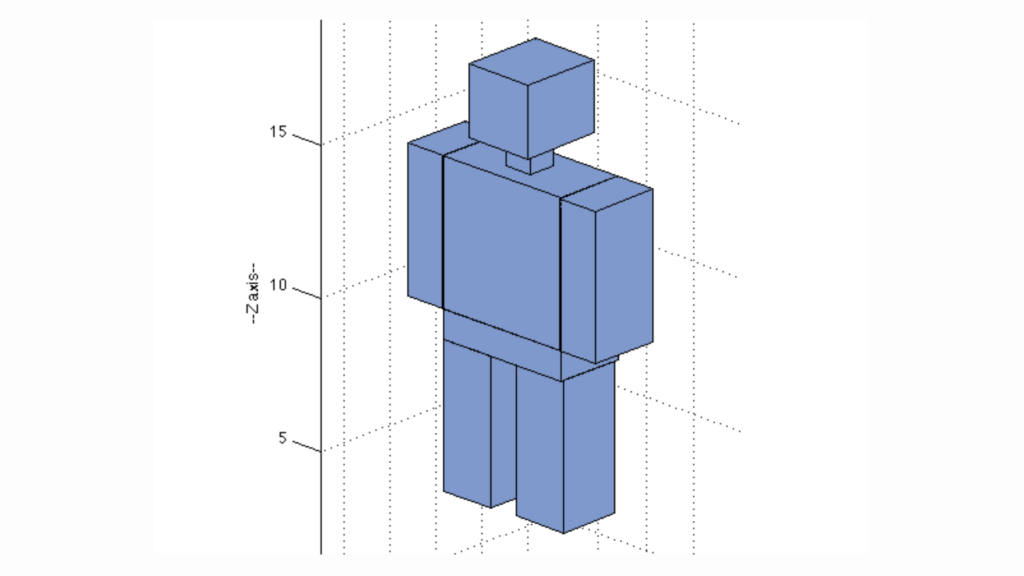
OBJ is a file format; a mesh representation of the outer surface of a 3D model. It defines geometry in terms of vertices and faces. Therefore, it applies to models built upon meshes as opposed to feature-based CAD information. The form is surface-oriented, rather than dimensional, tolerance-oriented, or manufacturability-oriented.
An exclusive benefit of OBJ is that it can contain both surface-related data and geometry. It is able to look at material files containing the information of color, texture, and shading. This explains why it is commonly used in cases where the models are obtained via scanning of objects in 3D, or cases where the surface appearance should be preserved as it appears when transferring the data. In such cases, maintaining surface continuity is of more concern than the way the part is to be fabricated.
As a manufacturing method, the OBJ files typically lie between design and production. They are used by engineers to check scan accuracy, surface quality, or create 3D printed models in colors or multi-materials. In the case of CNC machining, OBJ is not often a finished input, though it can be used to consider complex surfaces prior to transforming the model into a more suitable format, such as toolpath generation.
The OBJ file stores a model in the form of a list of surface elements, instead of solid features. It does not explain the part design or the way in which it is to be produced. Rather, it captures the shape of the final surface as a network of faces and points.
The file defines the model using vertex coordinates and face connections. Each face has a combination of several vertices forming a mesh. The model is determined by the density of a mesh. Smaller meshes capture more detail, but consume more space and time to process.
Mesh Structure in OBJ Files
OBJ files may have vertex normal data. This regulates the interaction of light with the surface and assists the software in showing smooth or sharp edges in the right way. Although this does not have a direct impact on machining, it is important in the inspection, visualization, and surface evaluation.
The format has the ability to connect to another material file that determines color and texture. This enables surface appearance to be the same across software platforms. The function is primarily applied in visualisation and multi-material or color three-dimensional printing processes.
OBJ does not maintain tolerances, units, or feature logic. It does not require CNC software to deduce machining plans. The file commonly requires conversion or reconstruction into a model that can be manufactured before production.
OBJ files are used in cases where surface accuracy and detail are important. The real shape of a model is stored as a mesh in them, with color or texture data where necessary. They are commonly used during the review of designs, scan analysis by engineers, or before making a part ready to be produced. It is not a directly machineable format, but assists in surface problems at the initial stage.
OBJ captures the mesh of an object, preserving curves and detailed shapes. It is significant to scan parts or freeform surfaces, where the slightest deformation can influence the placement or appearance.
OBJ may contain allusions to materials and textures. This assists the engineers and designers in visually testing the model or making it available to color or multi-material 3D printing, which is not possible with STL.
The majority of 3D scanners do not generate solid CAD features. OBJ is also capable of working with dense scan data and is therefore applicable to inspection, reverse engineering, or recreation of parts without any detail loss.
OBJ can be used with CAD, CAM, and visualization packages, most of them. It enables complex surface data to be shared amongst teams without proprietary formats, eliminating errors in file translation.
OBJ files are also common in verifying the surfaces and continuity of a surface before ultimate machining or printing. This prevents errors, provides seamless changes, and minimizes rework during the production of manufacturing-ready models.
OBJ files are strong at maintaining surface detail, and it has obvious limitations in engineering and manufacturing processes. They dwell on visual and mesh data, which may introduce issues between design and production.
OBJ has no tolerances, dimensions, or history. It cannot be directly used by engineers to generate CNC toolpaths or do accurate manufacturing checks. This renders it inappropriate as a production file.
OBJ files can be large, especially when they are capturing a complicated surface or scanned data, and they can have detailed meshes. This adds to software load-up time, slows down processing, and makes file sharing between teams harder.
To edit an OBJ, it is necessary to work with the mesh and not parametrically. It is common to change holes, curves, or critical geometry, which requires rebuilding portions of the model and introduces extra time and error-prone outcomes.
OBJ does not store information on units. The files that are exported in millimeters might also be in the form of inches in another program. Errors in scaling due to misinterpreted units can be errors in production.
Only external surfaces are stored in the format. There are no hidden features, internal structures, or assembly relationships. This does not allow it to be used in full mechanical modelling or multi-part assemblies.
STL 3D Print File
STL is a representation of the surface of a part that is a 3D file format consisting of a network of triangles. It contains no data on color, texture, or material-just the form. This simplifies and makes it dependable in the process of transferring models to 3D printers or CNC machines.
STL is popular due to its orientation on what is important to production: geometry. The file divides the surface into tiny facets, with software being able to compute toolpaths or slices of the layer with precision. It is also easily processed by both printing and machining because it is lightweight, as opposed to other formats, such as the OBJ.
STL is often used when engineers require a clean production-ready model that does not have additional visual or surface information. Although it does not handle tolerances or design intent, the shape remains as designed, which minimizes the errors in manufacturing processes.
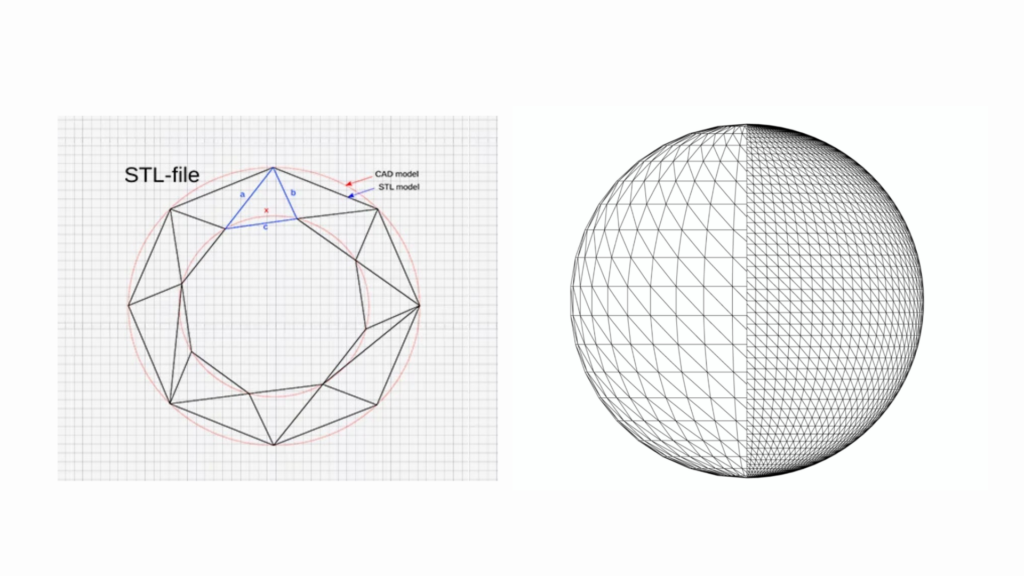
STL is used by subdividing the surface of a 3D model into tiny triangles, known as facets. A triangle is characterized by three corners and a normal vector that shows the direction of the triangle. This triangular mesh is an approximation of the shape of the part to allow software to process the part to get it printed or machined.
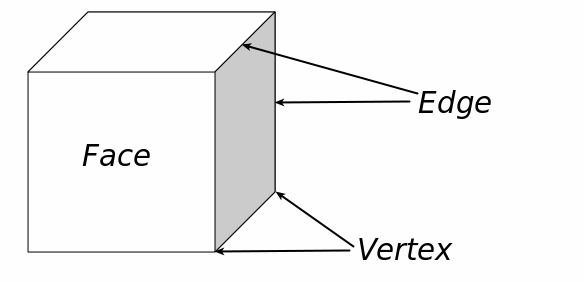
STL Triangle & Vertex
The whole model surface is defined as triangles that are interlinked. The smaller triangles record the curves and detail more precisely, whereas the bigger triangles are smaller and can reduce the fidelity of the surface.
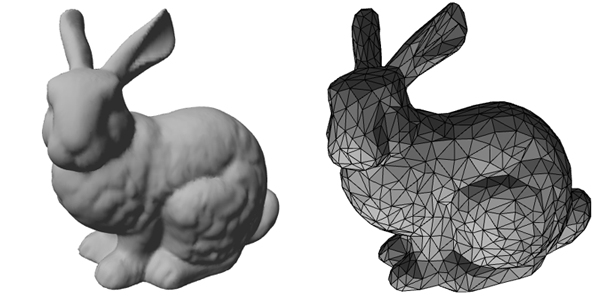
Bunny In STL File
STL does not retain any data regarding holes, edges, or internal structures outside of the mesh. It only transmits the surface, sufficient enough to slice in 3D printing or create toolpaths in CNC machining.
STL, in contrast to OBJ, does not support color, texture, or material data. It is entirely geometric and, therefore, makes files lean and compatible with the majority of manufacturing software.
STL files are quick to software-read due to the fact that they consist of triangles and normals only. Layers or toolpaths can be created based on the mesh by printers and CNC tools without any extra information.
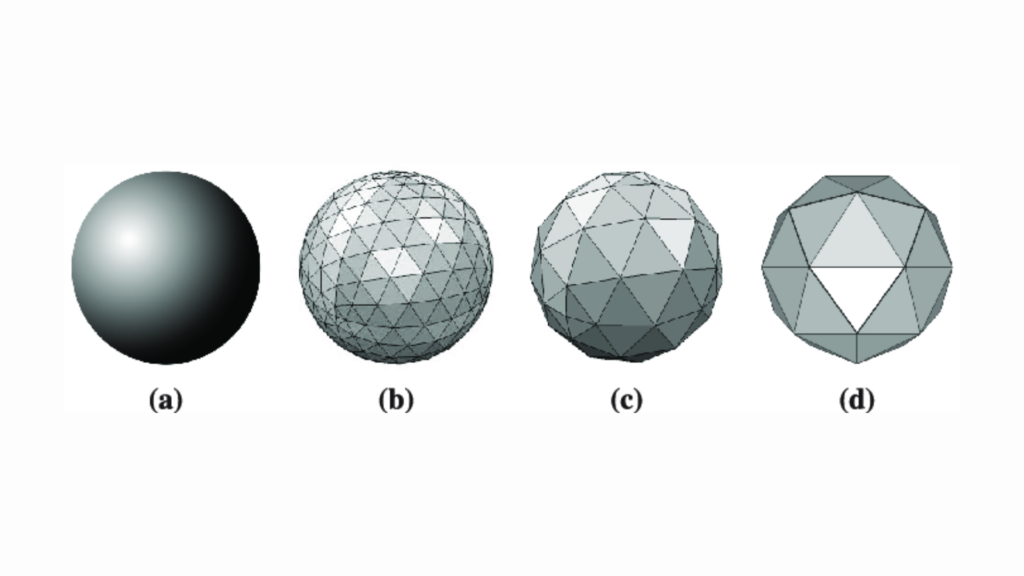
An STL Approximation of a Sphere composed of Triangular Planes
STL is also common in the fields of engineering and manufacturing since it concentrates on the geometry of the part, which the machines require most. It does not require additional visual or material information, and thus it is easy to use in production.
STL files simply store triangles on the surface and are therefore not hard to process. This causes them to be predictable in 3D printing and CNC machining without experiencing unforeseen failures due to feature incompatibility.
Even complicated models do not become too large. Smaller files can be loaded more quickly in CAM software, consume less processing time, and can be shared across teams.
STL can be used to capture curves, fillets, and freeform surfaces with the appropriate mesh density. This makes sure the parts fit well and work as they are expected.
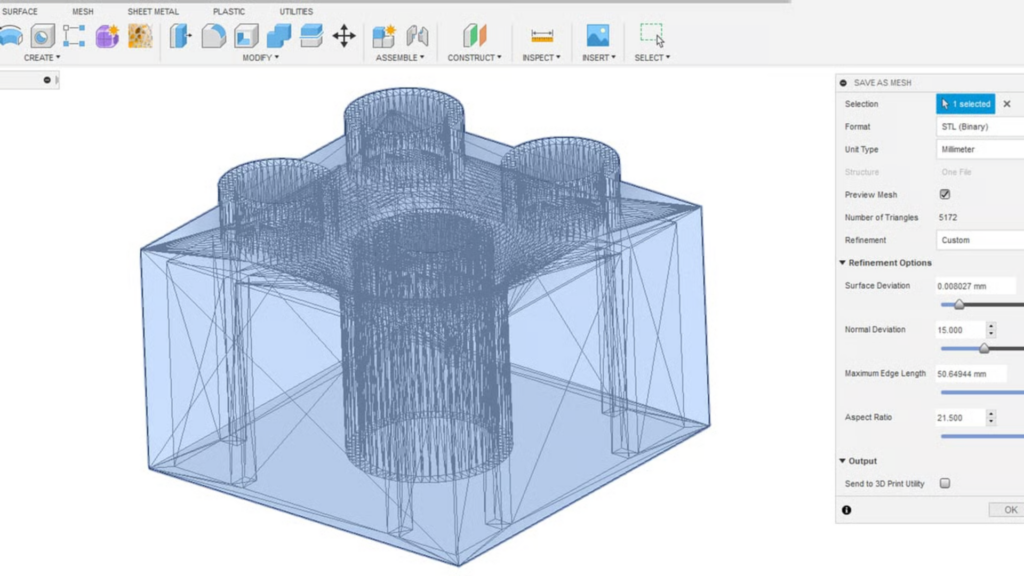
Export Model in STL
The majority of CAD, CAM, and 3D printing programs support STL. This eliminates conversion issues and provides a seamless interaction between the design and production.
Mistakes such as reversed triangles, holes, or gaps can be easily spotted and corrected before manufacturing. Repairing such initial saves time, material wastage, and eliminates expensive errors.
Since STL contains only the surface geometry, it can be used directly for slicing in 3D printing or generating toolpaths in CNC machining. This renders workflows predictable and efficient.
If you've worked with 3D models, you probably know OBJ and STL are the two formats you'll see most often. They are both geometry storing, but are very different in the actual workflow. Choosing the wrong one may cost you time or end up giving you problems down the line.
STL is simple: it divides the surface of a part into triangles, and that is all. This is sufficient for 3D printers or CNC machines since they also do not mind what it looks like. OBJ also has triangles, with the option of additional information such as surface normals, textures, and materials. This implies that OBJ is able to demonstrate the appearance of a surface, and not simply its form. In practice, STL is regarding, can I make this part? and OBJ is in regard to whether this surface looks right or not.
STL provides as much detail as you want, and it is all determined by the mesh density. Too thick, and the curves appear jagged; too thin, and the file is enormous. OBJ saves more information on the surface that will be useful in case you are dealing with scanned data or you want to verify the quality of the visuals. However, all the additional information is not needed in most cases of CNC or 3D printing operations.
STL files are less complex and smaller in size, easier to open, exchange, and process. OBJ files are much heavier as they contain the material and surface information. When you are simply going through with a CNC instruction, OBJ makes everything slower without any actual advantage. However, when scanning the components or when doing a color three-dimensional printing, OBJ is worth the space.
In almost all CAM, slicers, and CNC software, STL is supported. OBJ is also well-supported, but excels at CAD, visualization, or scan-to-CAD applications. During design review, you will find OBJ and STL, the one you submit to production.
Consider STL as the machine-ready form. It is clean, predictable, and does what you require to print or machine. The review format and detail format are OBJ. Apply it when you are assessing surfaces or when you are working with scans or preparing multi-material printouts. In numerous actual projects, an engineer will inspect or examine an OBJ, then export it to STL and have it produced.
In the choice between STL and OBJ, it all depends on what you want the file to accomplish. The selection of an incorrect format may lead to headache, time waste, or production errors.
When one is directly sending the file to a 3D printer or a CNC machine, the STL would be preferable. And it is easy and foreseeable, providing machines with exactly what they need. OBJ is more applicable when inspecting scans or reviewing design, or when surface information is important. Consider OBJ to be a review file and STL to be a production file.
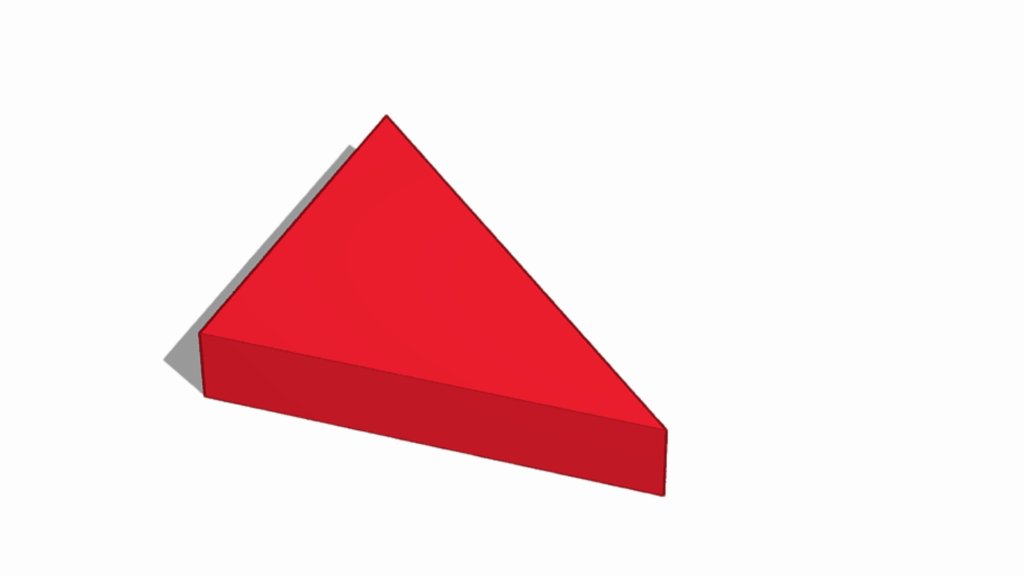
Triangle in STL File
STL can hold triangles only, so it is only fine curves or free-form surfaces that lose detail unless a sufficient mesh is used. OBJ also maintains surface normals and textures, and is thus more suitable for scanned components or where visual quality is critical.
STL files are smaller and less difficult to work with. OBJ files have a tendency to become large, particularly when working with detailed scanned models, and may slow down CAM software. STL makes it simple and effective when it comes to practical workflows.
STL does not support color or material data. OBJ is the more preferable choice in case you are about to prepare a multi-material or color 3D print. STL is adequate in case of normal machining or single-material printing.
In real-engineering processes, it is common to have many teams start with OBJ to be reviewed, inspected, or scan verified, and then STL exported to production. The appropriate format at the right stage prevents any rework and ensures a smoother transition to the manufacturing department.
At ApexRapid CNC, we handle everything from prototypes to production parts. Our team works closely with you to ensure your designs are accurately manufactured, whether through CNC machining, 3D printing, or other custom processes. Send us your CAD file or reach out today for a free quote.

HDPE VS. PP: Strength, Machinability, and Applications

Brass Vs Copper for CNC Machining: Which Material Is Best

CNC Plastic Machining: Plastic Selection, Machining Processes & Key Applications

A Complete Guide to Aluminum Sheet Metal Fabrication

Deep Hole Drilling: What It Is & How It Is Done?

Rapid Prototyping: All About Process, Techniques, Pros & Challenges & More